Searching CLIO
Check out these useful tips, hints, and tricks as you search library collections in CLIO.
Use CLIO Quicksearch to see combined results from five sources:
Library Catalog: Books, journals, video & audio recordings, government resources, and archival collections
Articles+: Journal articles, ebooks, dissertations, streaming video, and other online content
Academic Commons: Digital repository of Columbia research
GeoData: Columbia’s catalog of geospatial datasets
Libraries website: Information about the Libraries
General Search Tips
These search tips work across all five sources. Each data source has additional search options.
- Search exact phrases by putting them in quotes.
- “african national congress”
- Add an asterisk (*) after the root of a word to search for all possible endings.
- child* finds children, child’s, childhood, etc.
- Combine search terms using AND, OR, NOT (ALL CAPS) and parentheses to do complex Boolean searches.
- sachs AND (poverty OR poor)
- Click “View and filter” to view the full results and to make use of additional search options in a particular source.
Search the CLIO Catalog for books, journals & newspapers, conference proceedings, sound recordings & scores, videos, archival collections & oral history transcripts, government resources, online databases, maps & images, and more.
Catalog Search Tips
Refine your search using search facets. Once selected, these will remain in place until they are removed:
- Format
- Publication Date
- Author
- Country of Publication
- Location
- Language
- Subject – to find items about a topic
- Subject (Region) – Find items about a place
- Subject (Era) – Find items about a time period
- Subject (Genre) – Find items by type, e.g. correspondence, personal narratives, fiction
Brief information about availability and location are included in the search results. Click on the title to see the full record details and access options.
More Search Help
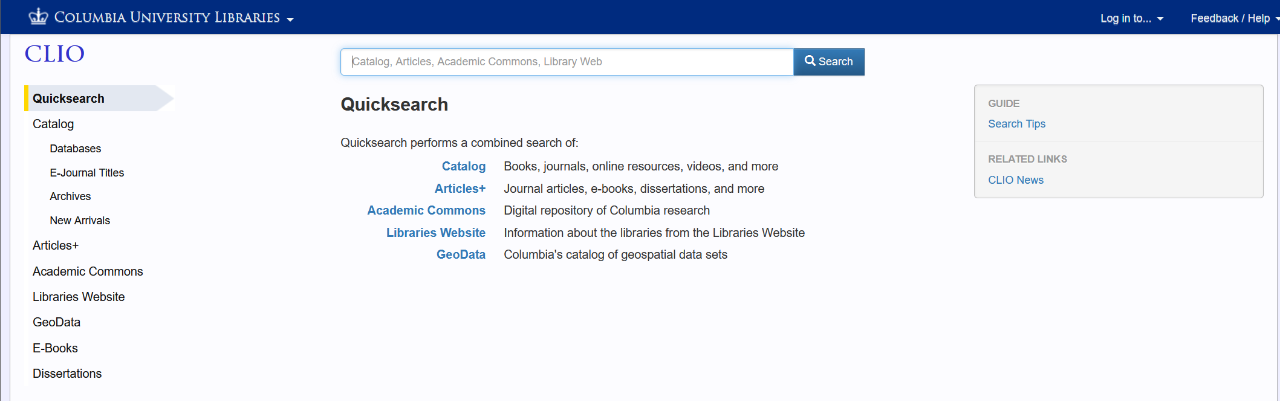
CLIO has different ways to search for specific types of materials or collections. Choose the type of materials you are looking for on the left side of the main CLIO search page.