Information for Electronic Resource Vendors
This page contains relevant information for Library vendors seeking to provide access to electronic resources, including Columbia University’s FTE, IP ranges, and email domains.This is intended to provide an overview of CU's electronic resources information environment. For more details contact the Electronic Resources Librarians.
For policy information, see "The Libraries' Expectations of Collection Vendors" portion of our Collection Development Policies & Strategies.
Columbia University, located in New York City. is a major U.S. research university. Columbia's Website provides more detailed information about the University.
Licensed electronic resources must be able to be made available to the entire (current) Columbia community, including locations in campus buildings, dorms, offices, libraries, as well as to off-campus locations such as faculty offices and housing. All Columbia users of licensed commercial resources are validated through the University's authentication/authorization system, using either Kerberos or an equivalent Web-based technique.
Updated 07-27-2026
Size of site in number of FTE (full-time equivalent) users:
| Columbia University Division | Students | Faculty | Total |
|---|---|---|---|
| Columbia | 31,843 | 4,881 | 36,724 |
| Barnard | 3,200 | 364 | 3,564 |
| Teachers College | 4,070 | 212 | 4,282 |
| Union Theological Seminary | 234 | 31 | 265 |
| Total | 39,347 | 5,488 | 44,835 |
Sources:
Columbia Statistical Abstract, https://opir.columbia.edu/abstract, "Columbia University Full-time, Part-time Headcount and Full-time Equivalent Enrollment by Degree Status, Fall 2025 Total All Levels" and "Full-time Faculty Distribution by School/Division, Fall 2016-2025" Accessed 07/27/2026
Barnard Common Data Set, 2025-2026, https://barnard.edu/institutional-research#common-data-set, Accessed 07/27/2026
Teachers College, Department of Institutional Research, FTEs for academic year 2024-2025, Email dated 07/27/2026
Association of Theological Schools Annual Data Tables, 2025-2026, https://www.ats.edu/resources/institutional-data/annual-data-tables, Accessed 07/27/2026
Domain name
*.columbia.edu
Email Domains
Users have email addresses at the following Columbia University email domains. There are also forwarding domains that may be used (Columbia's Approved Forwarding Domains):
- @columbia.edu
- @cumc.columbia.edu
- @barnard.edu
- @tc.columbia.edu
- @uts.columbia.edu
- @utsnyc.edu
Proxy Server
The Libraries operates a rewriting proxy server from within campus IP ranges, at present on the 128.59.xxx.xxx subnet.
Columbia IP Address Ranges
Columbia University is registered with the IP Registry.
NOTE: The information below is correct as of 7/13/2021. All IP addresses within these ranges are for Columbia University.
| Network Address Ranges | CIDR Notation | Type | Description | |
|---|---|---|---|---|
| 128.59.*.* | 128.59.0.0 - |
128.59.0.0/16 | CLASS B | Morningside Heights |
| 129.236.*.* | 129.236.0.0 - |
129.236.0.0/16 | CLASS B | Lamont Doherty / Nevis |
| 132.174.253.182 | 132.174.253.182 - |
132.174.253.182/32 | CLASS B | Law Library IP |
| 156.111.*.* 156.145.*.* |
156.111.0.0 - 156.145.0.0 - |
156.111.0.0/16 156.145.0.0/16 |
CLASS B | Columbia Medical Center |
| 160.39.*.* | 160.39.0.0 - |
160.39.0.0/16 | CLASS B | CIESIN / Morningside Heights / Barnard College |
| 192.12.82.* | 192.12.82.0 - |
192.12.82.0/24 | CLASS C | [testing, etc.] |
| 192.5.43.* | 192.5.43.0 - |
192.5.43.0/24 | CLASS C | |
207.10.136-143.* |
207.10.136.0 - |
207.10.136.0/21 |
CLASS C |
|
209.2.47.* |
209.2.47.0 - |
209.2.47.0/24 |
CLASS C |
|
209.2.48-51.* |
209.2.48.0 - |
209.2.48.0/22 |
CLASS C |
International House Dormitory |
209.2.185.* |
209.2.185.0 - |
209.2.185.0/24 |
CLASS C |
|
209.2.208-223.* |
209.2.208.0 - |
209.2.208.0/20 |
CLASS C |
Interchurch Building |
209.2.224-239.* |
209.2.224.0 - |
209.2.224.0/20 |
CLASS C |
|
Proxy Server IP: 128.59.222.107
Test Proxy Server IP: 128.59.241.157
Notes
In the above notation scheme "*" (asterisk) is used as a placeholder for all numbers in the range 0-255.
This table formerly included CLASS C IP range 192.5.43.* However, here are currently no devices on that network and it is unlikely that any future residents on that network will be Columbia- affiliated.
CIESIN (Center for International Earth Science Information Network) added 7/23/98.
Columbia Biosphere addresses changed 9/23/99.
New HS range 156.145.0.0 added 3/15/2001.
Columbia Biosphere addresses removed, 12/23/2003.
Use of 192.12.82.0 Class C license clarified, 9/20/2004.
New Law Library Proxy IP 132.174.253.182 added 7/13/2021
We encourage vendors to contact us to discuss these requirements if there are any questions about them.
Proxy Server
Columbia employs a proxy server when needed to provide access to members of the Columbia community not directly connected to the campus network.
EZproxy URL: https://ezproxy.cul.columbia.edu/login?url=
OpenURL
Columbia uses link resolver software to connect users to online full text options and to internal services for locating and requesting full text. The openURL resolver accepts queries in versions 0.1 and 1.0.
Base URL for Link Resolver: https://valet.cul.columbia.edu/elink?
Custom Image: https://toolkit.library.columbia.edu/v2/img/columbia-elink.png
Custom Text: Columbia e-link >>

Personal IDs/Passwords
Authentication via individual, personal id/passwords is unworkable at Columbia, given the size of the campus and the number of departments, schools, centers needing access to networked information.
Cookies Policy
Persistent cookies are not an acceptable means of authorization or profiling in the Columbia environment. Public workstations are configured to erase all temporary files each time the browser is restarted. Session cookies used by the vendor solely for authorization or session-management are acceptable.
Privacy Requirements
Services licensed by Columbia that gather user or marketing data are required to notify users in each session how and why this data is being collected and to provide users the option of not having such data collected about them.
Title-Level Access
It is extremely important for us to be able to connect from our own Web-based campus information system menus directly to specific external databases or "titles," rather than via vendor "welcome" or menu screens. Because we obtain online services from a large number of information vendors, we need to be able to interpose our own menus, finding aids, expert help systems, etc. between the user and specific remote resources. In other words, we need to be able to go directly from a menu entry on our system to the actual opening search screen of a SINGLE remote database, without having users navigate additional introductory vendor screens or menus. If we are licensing multiple databases from a single vendor, each must be individually addressable at a single URL.
Hardware Environment
No campus-wide statistics are available. Staff, desktop & laptop machines are normally either Intel or Apple Macintosh PCs running various levels of Microsoft & Apple software. Public workstations include Intel-based PCs running Linux.
Software & Access Environment
We strongly prefer "open" products at Columbia that are wide-area networkable across all platforms and searchable using recognized national and de facto standards. No local loading of databases is feasible because of the high costs and overhead associated with it. Proprietary database packages or retrieval systems are not normally purchased or supported by Columbia University Libraries.
Browser Requirements
All access and full functionality must be available to those with Chrome, Firefox or Microsoft Edge. In addition, because Columbia continues to have a number of users with slower, modem-based connections, all information and services should be usable at dial-up speeds as well.
CU Internet Connection
Central campus has a 155 Mbps connection to Broadwing, which provides access to the commodity Internet. The university is also a member of NYSERNet, with a 155 Mbps Internet 2 connection via the Abilene network. Students, faculty and staff have the option of connecting their personal computers directly to the campus network using high-speed wired ethernet or wireless service. Many connect to campus remotely via non-Columbia ISPs. A small campus modem pool is available as backup for those without ISP access.
Information providers with whom Columbia contracts for access to databases or other information services are asked to communicate with us regularly and in a timely way about the following:
Planned service unavailability
Expected uptime after extended emergency downtime
Any significant change in the content or scope of the database or information service
Any significant change or enhancement to the user interface, searching capabilities, technical requirements (e.g., Java, XML, special plug-ins)
Any change to existing authentication / authorization techniques
Any change to the base URL to which local users and interfaces must connect. (This is important in order for us to update local proxy servers and Web interfaces.)
Any other change to the service that might affect local systems, user access, local documentation, or the scope and nature of the service
Vendors are asked to forward such information via email to CU Libraries at the following address: cul-ner@columbia.edu
CU Libraries strongly prefer that statistics be provided in a COUNTER compliant format. Vendors are requested to collect, format and make available use statistics to us as described in those guidelines.
Columbia University Libraries branding should be prominent and consistent across all of our web properties and services. CUL expects the option to place prominent branding (preferably a Columbia University Libraries banner) on vendor and publisher pages and service.
For policy information, see The Libraries' Expectations of Collection Vendors portion of our Collection Development Policies & Strategies.
Fully Functioning Library Banner
This is the desired level of branding across Columbia University Libraries electronic resources.
Design Requirements
The CUL banner should have top presence, above any vendor, publisher, or product logos or branding.
The CUL banner should be accessible across all pages of the e-resource(s).
Functional Requirements
- The Columbia University Libraries banner should be fully interactivce and clickable with drop-down menus, per the following example.
- Advertising should not be placed on pages or services associated with library resources. For the avoidance of doubt, this does not include advertising that is part of the content itself, such as ads found within journals, magazines, archival or primary source material, etc.
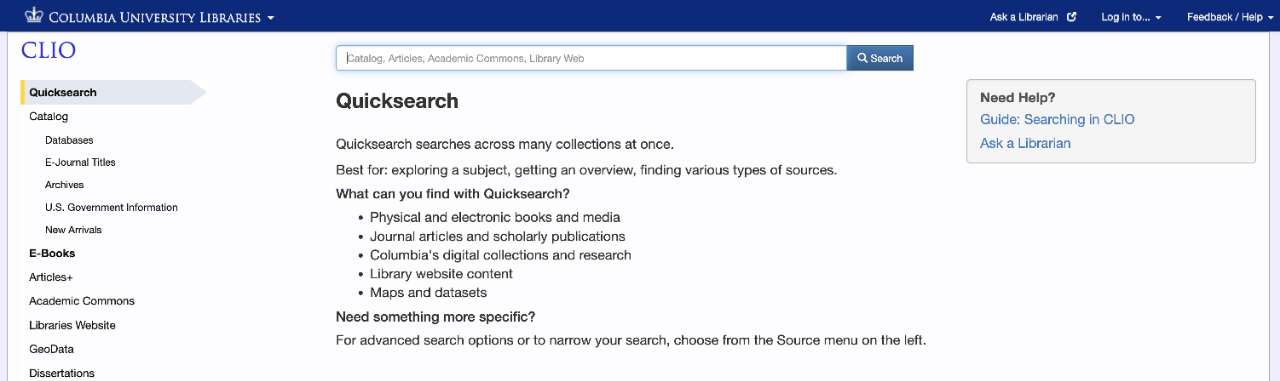
Library Prominent Banner
Design Requirements
The Columbia University Libraries banner should be the main and largest branding/logo on the page.
The CUL banner should have top left presence, above any vendor, publisher, or product logos or branding.
The CUL banner should be accessible across all pages of the e-resource(s).
Functional Requirements
Columbia University Libraries banner should be clickable back to the library home page, https://library.columbia.edu/.
A link to "Ask a Columbia Librarian" should be on the site, https://resolver.library.columbia.edu/lweb0031.
Advertising should not be placed on pages or services associated with library resources. For the avoidance of doubt, this does not include advertising that is part of the content itself, such as ads found within journals, magazines, archival or primary source material, etc.
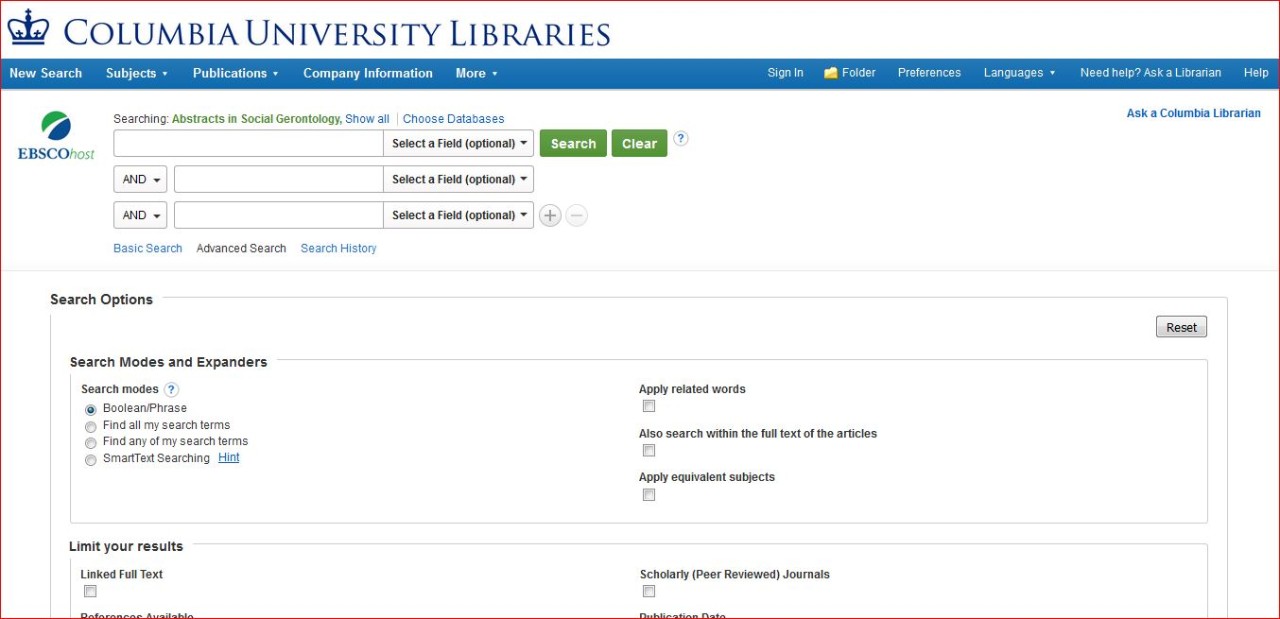
Contact for General Information, Ordering, Payment, Problems, Technical:
cul-ner@columbia.edu
Columbia University Libraries
Collection Strategies - 106 Butler Library
535 West 114th Street
New York, NY 10027