Digital Imaging Lab Best Practices
The Digital Imaging Lab (DIL) creates digital surrogates of the cultural heritage materials held by the Columbia University Libraries. The digitization of these materials is consistent with the practices defined in the Federal Agencies Digitization Guidelines Initiative (FADGI) guidelines. Our capture parameters and performance expectations (resolution, grey balance, tonal and color accuracy) for the workstations are informed by these guidelines. The file validation software OpenDice as well as JHOVE as well as checksums are utilized to ensure file integrity, faithful color reproduction and tonal accuracy.
The goal of digital reformatting is to produce a rich digital master image file. The digital master image file has the following attributes (NARA 2004):
- Digitization is done in a “use neutral” manner, not for any specific output. The image quality parameters are selected to satisfy most types of outputs.
- The primary objective is to create digital images that look like the original objects and are “reasonable” reproductions without enhancements.
- Master Image Files document the object at the time of capture, not what it might have once looked like if restored to its original condition.
- The Digital Imaging Lab creates and archives an “optimized” master file. With the advent of RAW files and raw file converters (Capture One is used primarily), all of the file editing can be done at the RAW conversion stage. Because of this we only create and archive a file conforming to the TIFF 6.0 specification where all of the edits have already been performed in the raw to tiff conversion stage negating the need for creating service files. Any and all derivatives are created from the optimized master file.
The Digital Imaging Lab (DIL) is a color-managed environment. The aim of color management is to bring the color behavior of the various devices used in the lab to a known and defined state. This is accomplished by building a profile of each device’s response to color. For a monitor, special software is used to measure how it displays certain defined colors, as well as calibrating the monitor’s white point and brightness to accepted standards. For a scanner, software measures how the device records certain defined colors. In both cases the software then creates a look up table (LUT) to correct for any deviation from the defined color. This look up table is usually called the input profile (for a scanner) and display profile (for a monitor).
Using a Colorchecker SG target a gray balance and exposure are determined at the beginning of every session. These parameters are applied to each successive image exposed throughout the session. The Colorchecker SG target is verified by use of the OpenDice software. A delta e of 3 or less is the goal. The Delta e for each colorchecker target will be recorded as part of the file name.
For example: 190200_color_600ppi_17e.tif
This gray balance, plus cropping, USM, down sampling and other slight edits are applied during the RAW to TIFF (Master File Format) conversion to create our Archival Master File. A copy of the gray balanced Colorchecker target for each session is archived and associated with the Archival Master Files.
A Golden Thread target (DICE target) is used to analyze the conformance of the DIL hardware to FADGI standards on a monthly basis.
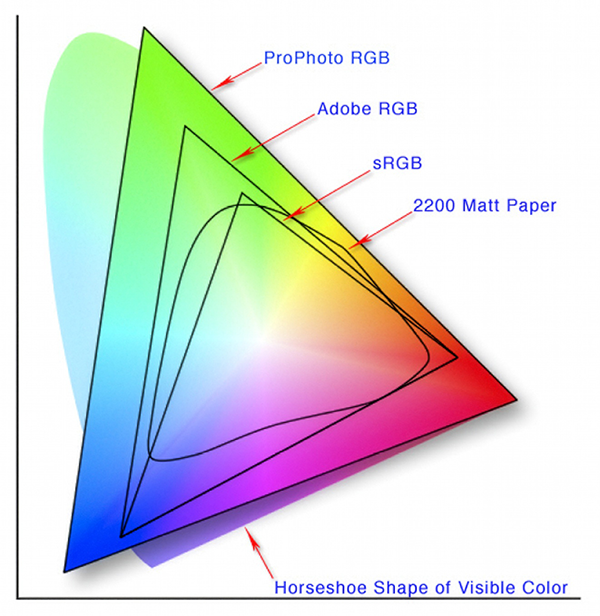
A color model is a mathematical representation of color (such as RGB, LAB or CMYK). It is a general system for assigning numbers to color. A color space is an instance of a color model. There are many color spaces such as ProphotoRGB, sRGB and AdobeRGB. The important thing to consider in choosing a color space is how much of the visible color spectrum it represents (gamut) and whether it is a well-documented.
The AdobeRGB (1998) color space was chosen as the common “editing space”. It has a slightly wider gamut than sRGB, the default color space for the web and some printers.
Adobe RGB (1998) is well documented and it is in common use in the digital imaging field. Any necessary tonal adjustments of the digital files are made in this specific color space. The AdobeRGB (1998) color space is embedded in every file.
Spatial Resolution
The Digital Imaging Lab following FADGI guidelines captures images at 400 pixels per inch for reflective material whenever practical. When an item measures 5” x 7” or smaller that item will be captured at a higher spatial resolution in order to ensure sufficient detail to best represent the item digitally. On the other end, when an item is excessively large it will be captured at a spatial resolution of 300 ppi.
Reflective Material (Photographs, Drawings, Paintings, etc.):
- Default: 400 ppi
- 5 x 7 or smaller: 600 ppi
- 18 x 24 or larger: 300 ppi
Tonal Resolution
The Digital Imaging Lab captures and saves digital files at 16-bit depth. This ensures a sufficient number of tones to allow for significant image editing, if necessary, at a later stage in the digital file life cycle.
To facilitate the preservation of the digital files created in the Digital Imaging Lab technical metadata about the digital files is recorded. A majority of the basic image information (resolution, color space, bit depth, etc.) is captured in the EXIF (Exchangeable Image File Format) files and can be viewed in Photoshop’s File Browser.
The Image Production values recommended by the NISO Z39.87 standard need to be recorded manually. The Digital Imaging Lab embeds the following environmental technical metadata into the image file:
Image Producer, Host Computer, OS, OS Version,Camera/Scanning Back Manufacturer, Camera/Scanning Back Model Name, Camera/Scanning Back Software, Scene Illuminant, Camera Body, Camera Lens, Target Type
An example of a string embedded in the tiff header:
CUL, Mac Pro, OS X, 10.8.5, Sinar 86H, Sinar CaptureFlow Studio 1.3.1, LED, TTI 67ei, Sinaron 55mm f4.5, ColorChecker

David Ortiz
Manager, Digital Imaging Lab
- Preservation